Keeping your home files organized is one of the most transformative yet overlooked habits you can build. Whether you are dealing with stacks of paper clutter on your kitchen counter or hunting through a chaotic digital folder structure on your laptop, the way you categorize and store your documents directly impacts your daily productivity, mental clarity, and peace of mind. Home file organization categories serve as the foundational blueprint for any system that actually works over the long term. This guide walks you through everything from basic physical filing principles to advanced digital file management strategies, giving you practical, actionable steps you can implement today.
Why Home File Organization Categories Matter
Most people underestimate how much time they waste searching for misplaced documents. Research suggests that the average professional spends up to 18 minutes per day looking for files or information they need. Over a year, that adds up to more than 90 hours of lost productivity. Establishing clear file organization categories for your home eliminates this waste and ensures that every document has a logical, consistent place.
Beyond time savings, organized files reduce stress during tax season, insurance claims, home repairs, and financial audits. When you know exactly where every important document lives, you stop dreading those moments when someone asks for a specific bill, receipt, or contract. A well-designed home document filing system also protects you from losing critical paperwork that could lead to missed payments, expired warranties, or compliance issues.
Core Home File Organization Categories
The most effective approach is to divide your files into broad, intuitive categories that mirror how your household actually operates. Rather than organizing by file type alone, organizing by life function creates a system that feels natural and is easy to maintain.
1. Financial Documents
Financial records form one of the most critical pillars of your home filing system. This category should include tax returns, pay stubs, bank statements, investment account records, loan agreements, mortgage documents, and insurance policies. Subdivide this further into current-year active files and archived records for past tax periods.
- Tax returns and supporting receipts (store for at least 7 years)
- Bank and credit card statements
- Investment and retirement account statements
- Loan and mortgage documentation
- Insurance policies (health, auto, home, life)
2. Household Administration
This category captures the everyday operational documents that keep your household running smoothly. Think utility bills, lease or mortgage contracts, home warranty documents, appliance manuals, and maintenance schedules. Many people overlook this category until they need to reference a specific document and cannot find it.
- Utility bills (electricity, water, gas, internet)
- Home repair and maintenance records
- Warranties and purchase receipts for major appliances
- Lease agreements or property deeds
- Homeowner association rules and correspondence
3. Personal Identification and Legal Documents
Safeguarding your identity-related documents is non-negotiable. Passports, birth certificates, Social Security cards, driver’s licenses, wills, power of attorney forms, and property titles all belong in a secure, clearly labeled section. These documents often have long retention requirements and occasional urgency, making accessibility essential.
4. Medical and Health Records
Health documentation includes insurance cards, medical bills, prescription records, vaccination histories, and appointment summaries. Keeping these organized helps you manage claims, track family health histories, and respond quickly when providers request past records. Consider a dedicated subfolder for each family member to keep things streamlined.
5. Education and Professional Documents
diplomas, transcripts, professional certifications, employment contracts, performance reviews, and resumes belong in this category. Whether you are a student, a parent managing school records, or a professional tracking career milestones, maintaining organized files in this area saves significant time during applications, audits, or job transitions.
6. Household and Lifestyle
This broader catch-all covers receipts for purchases, warranties for electronics, travel itineraries, subscription service details, and home improvement project plans. It also includes documents related to vehicles such as registration papers, service records, and insurance claims.
Physical vs Digital: Comparing Home File Organization Approaches
Every household benefits from a hybrid approach that combines physical and digital organization. The table below outlines key differences and strengths of each method to help you decide how to allocate your filing efforts.

| Aspect | Physical Filing | Digital Filing |
| Best For | Original signed contracts, tax returns, passports, handwritten notes | Scanned duplicates, receipts, daily documents, collaborative files |
| Accessibility | Requires physical presence near the filing cabinet | Accessible from any device with internet access |
| Security | Vulnerable to fire, water damage; needs a fireproof cabinet | Vulnerable to data loss; requires cloud backup and encryption |
| Search Speed | Slower; depends on consistent labeling | Faster with proper naming conventions and search functions |
| Maintenance | Requires periodic purging and reorganization | Requires backup schedules and folder hygiene |
| Cost | Filing cabinets, folders, labels, printer supplies | Cloud storage subscriptions, scanning equipment |
The smartest households use physical storage for irreplaceable originals and digital storage for everything else. Scanning incoming paper documents immediately and storing both versions ensures redundancy without clutter.
Beginner-Level File Organization Strategies
If you are just starting to build your home file management system, resist the urge to create an overly complex structure. Begin with the six core categories listed above and use simple hanging file folders or desktop directories. The goal is sustainability, not perfection.
Start by gathering all loose papers into one box or pile. Sort them into the broad categories as you go. Shred anything that is outdated or no longer needed — typically anything older than seven years for financial records unless it involves property or tax documentation. Create a simple inbox tray on your desk for incoming papers that need filing, and commit to processing it once a week.
For digital files, begin by creating a top-level folder named “Home Files” with subfolders matching your physical categories. Use consistent naming conventions like “YYYY-MM-DD_Category_Description” so that files sort chronologically and remain easy to find later.
Intermediate Organization: Building a System You Can Maintain
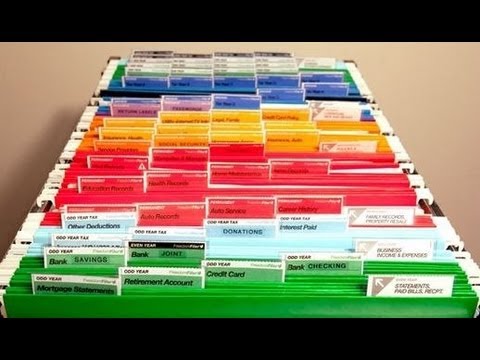
Once the basics feel natural, elevate your system by introducing subcategories and automation. For example, within your Financial Documents folder, create subfolders for Banking, Taxes, Insurance, and Investments. Color-code your physical hanging folders so you can scan the cabinet at a glance and locate what you need.
Set up recurring calendar reminders to review and purge outdated files quarterly. Automate bill payments and digital receipt capture through apps like Expensify or your bank’s mobile platform. This reduces the volume of paper entering your system and keeps your active files lean.
Consider implementing the “One Touch” rule — handle each piece of paper or digital file exactly once: act on it, file it, or discard it. This habit prevents the accumulation of duplicate sorting sessions that waste time and create confusion.
Advanced Techniques for Power Users
For households managing complex finances, multiple properties, or small businesses from home, advanced categorization becomes essential. Consider creating a separate category for Business Documents if you operate a home-based enterprise. Within digital systems, use metadata tagging to add searchable keywords beyond the folder name.
Implement a document lifecycle management approach where each category has defined retention periods. Financial tax records may be archived after seven years, medical records after the statute of limitations for claims in your state, and utility bills after annual reconciliation. This prevents storage bloat and keeps your system efficient.
Leverage tools like Evernote, Google Drive, or dedicated home management apps like HomeZada to create searchable databases that cross-reference physical and digital files. Tagging documents with keywords like “warranty,” “recurring,” or “tax-related” makes retrieval instantaneous even as your collection grows.
Expert Tips to Keep Your System Working Long-Term
- Audit annually. Schedule a yearly review session to reassess whether your categories still reflect your household’s actual needs.
- Keep it simple. If your family cannot find files in the system, the system is broken — not too complex.
- Use consistent naming. Whether physical or digital, uniformity in labeling is the single biggest factor in long-term usability.
- Back up digitally. Use a 3-2-1 backup strategy: three copies, two different media types, one offsite or in the cloud.
- Involve the household. Teach every adult and teenager where files belong so maintenance becomes a shared responsibility.
Common Mistakes to Avoid When Organizing Home Files
Overcategorization is the number one mistake people make. Creating 30+ folders sounds thorough but guarantees that no one will remember where anything lives. Keep your primary categories to fewer than ten and use subcategories sparingly. Another common error is failing to purge regularly — a filing system that never gets cleaned out becomes a graveyard of outdated documents that slow down every search.
Neglecting digital organization is equally damaging. Many people meticulously file paper documents but leave their computer desktop and downloads folder completely chaotic. Your digital filing deserves the same attention and structure as your physical one.
Conclusion
Building an effective system of home file organization categories is not about perfection — it is about creating a reliable, repeatable process that serves your household’s needs today and scales as your life evolves. Start with the core categories outlined in this guide, implement a hybrid physical-digital approach, and commit to small weekly maintenance habits. The result is a home environment where important documents are always easy to find, stress around administrative tasks drops dramatically, and you gain back hours of your life every year. Your future self will thank you every time you need a document and find it in seconds.
Frequently Asked Questions
What are the best home file organization categories for a small family?
For a small family, the six core categories — Financial Documents, Household Administration, Personal Identification and Legal Documents, Medical and Health Records, Education and Professional Documents, and Household and Lifestyle — provide a comprehensive yet manageable framework. Keep subcategories to a maximum of three or four per main folder to avoid confusion.
How long should you keep physical tax documents and financial records at home?
Most tax professionals recommend keeping physical tax returns and supporting documentation for at least seven years from the filing date. This aligns with the IRS statute of limitations for audits and claims. Documents supporting property purchases should be retained for as long as you own the property plus seven years after sale.
What is the best way to transition from a cluttered filing system to an organized one?
Start by sorting everything into broad piles matching your core categories. Shred documents older than seven years that are no longer needed for tax or legal purposes. Set up a simple filing cabinet or desktop organizer with labeled folders for each category. Process new documents immediately using the “One Touch” rule to prevent future clutter buildup.
Should you scan all physical documents or only certain types?
Prioritize scanning documents that are irreplaceable or frequently referenced, including tax returns, property deeds, insurance policies, medical records, and identification documents. Everyday receipts and routine utility bills can be managed digitally from the start or scanned in bulk during periodic cleanup sessions.
Create a shared master system with clearly labeled subfolders for each household category, then add individual subfolders for each family member within categories like Medical and Education. Use cloud-based storage platforms with shared access so everyone can contribute and retrieve documents without duplicating effort.